One tap, details later
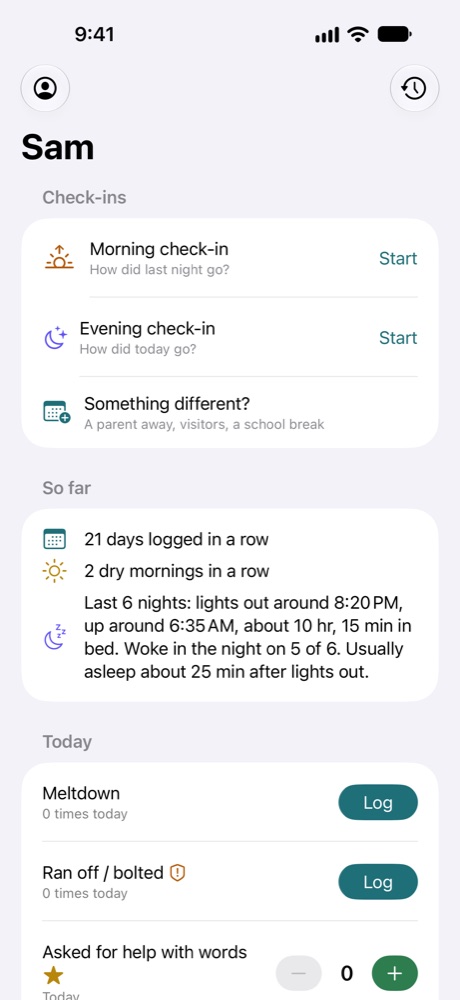
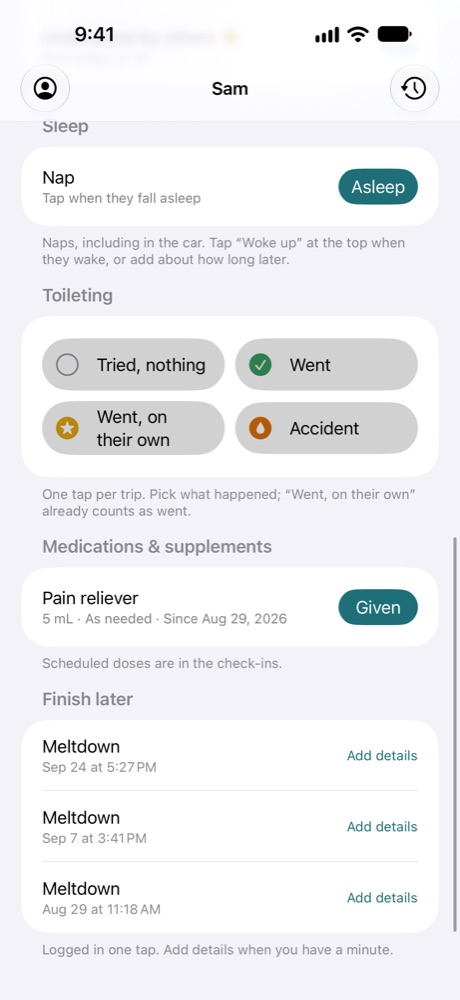
Tap when it happens and the time is saved. What came right before and after, where, how long and how intense can wait under "Finish later."
For parents of kids with autism, ADHD, and other needs
BehaviorTrail turns the hard moments, wins, sleep, and medication doses of your child's days into one clear trail. A tap when something happens, a quick check-in morning and evening, and a report that lays it all side by side, so your care team sees what actually happened, not just what anyone remembers.
Coming soon for iPhone. Now in testing.

Built for the hard moment, not the quiet evening after. Capture first; details can wait.
Tap when it happens and the time is saved. What came right before and after, where, how long and how intense can wait under "Finish later."
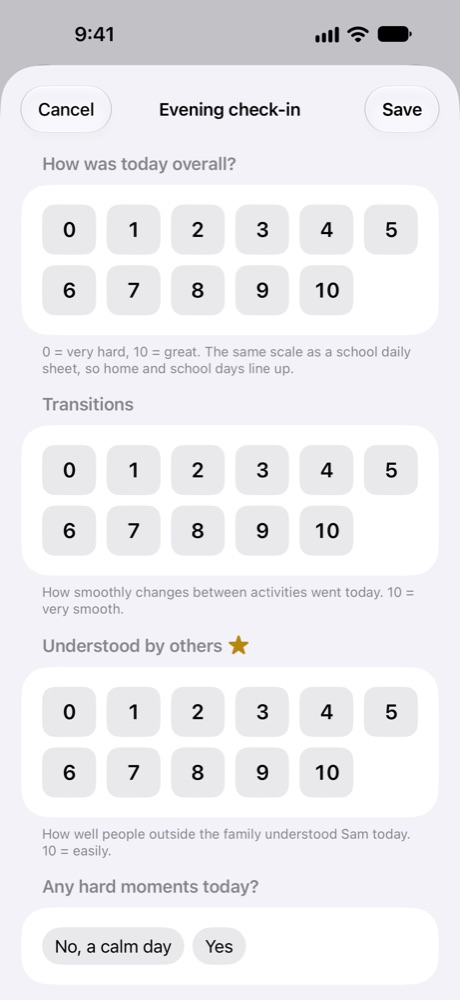
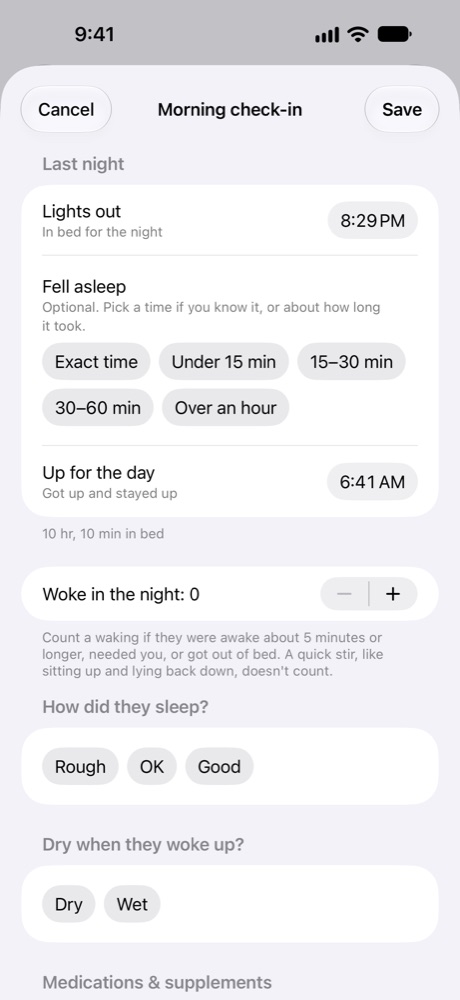
Lights out, fell asleep, night wakings and morning doses; then rate the day 0 to 10 and mark a calm day. Pre-filled from your usual times, so most mornings are one tap.
Siri, the Home Screen widget, Control Center, the Action button, or an NFC tag on the fridge. Hands full in the car? "Log meltdown in BehaviorTrail."
One tap per bathroom trip: tried, went, went on their own, or an accident. Every medication and supplement dose saved with its time.
Calm days, dry mornings, asking for help with words, new skills. They get as much space as the hard moments, with streaks from the first week.
Invite a co-parent or caregiver through iCloud. You both add to the same trail, and each entry shows which phone added it.
Tell me about today
At bedtime you're tired, and the day is a blur. Tell BehaviorTrail about it in your own words, for as long as you like. It sorts what you said into the same clear entries the report uses, asks about anything you skipped, and shows you everything before it's saved.
1You talk
Rough afternoon. She had a meltdown in the car after we left the park, screaming and kicking, maybe ten minutes. She fell asleep on the way home. Three trips to the potty, one wet accident. Gave her melatonin at bedtime. Overall, maybe a six.
2It asks what's missing
About when was the car nap, and how long?
Around four. Twenty minutes, maybe.
Did she have her afternoon dose?
Yes, at three.
Only what you track, only what's missing, and never advice. Answer out loud, tap, or skip.
3Your care team sees
Each entry keeps the words it came from. Tap any one to fix it before you save.
Snap the sheet that comes home in the backpack. Names and signatures are covered on your iPhone before anything is sent; you see exactly what will be read. The marks come back in the school's own words, AM and PM, so the report can show home and school side by side without turning "Challenging" into a number.
Part of BehaviorTrail Plus, an optional subscription, coming soon. Logging, check-ins, sharing, the report, and export are always free. How your information is handled
No two kids, and no two care teams, watch the same things. You choose what goes on the trail, and everything else stays out of the way.
The report
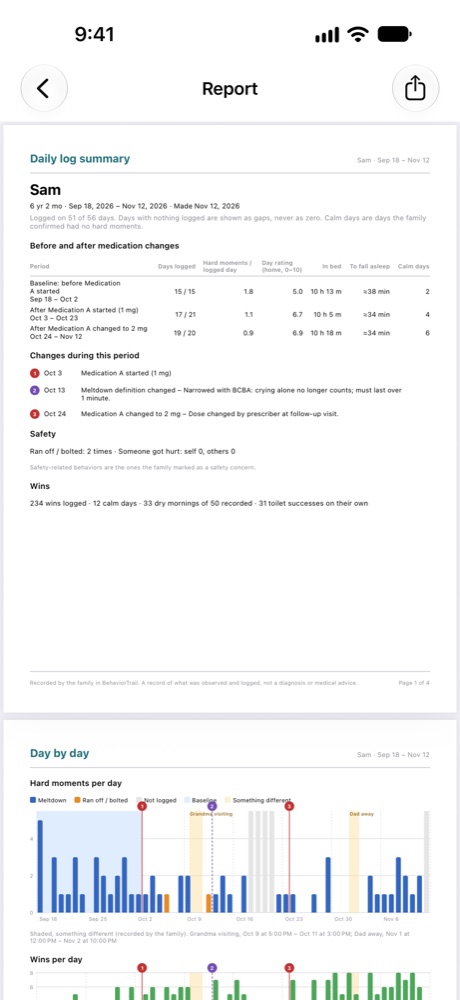
Appointments are short. Two months of mornings, meltdowns and medication changes don't fit in a conversation. The report puts them on a few pages your pediatrician, BCBA, therapist or IEP team can read in a few minutes.
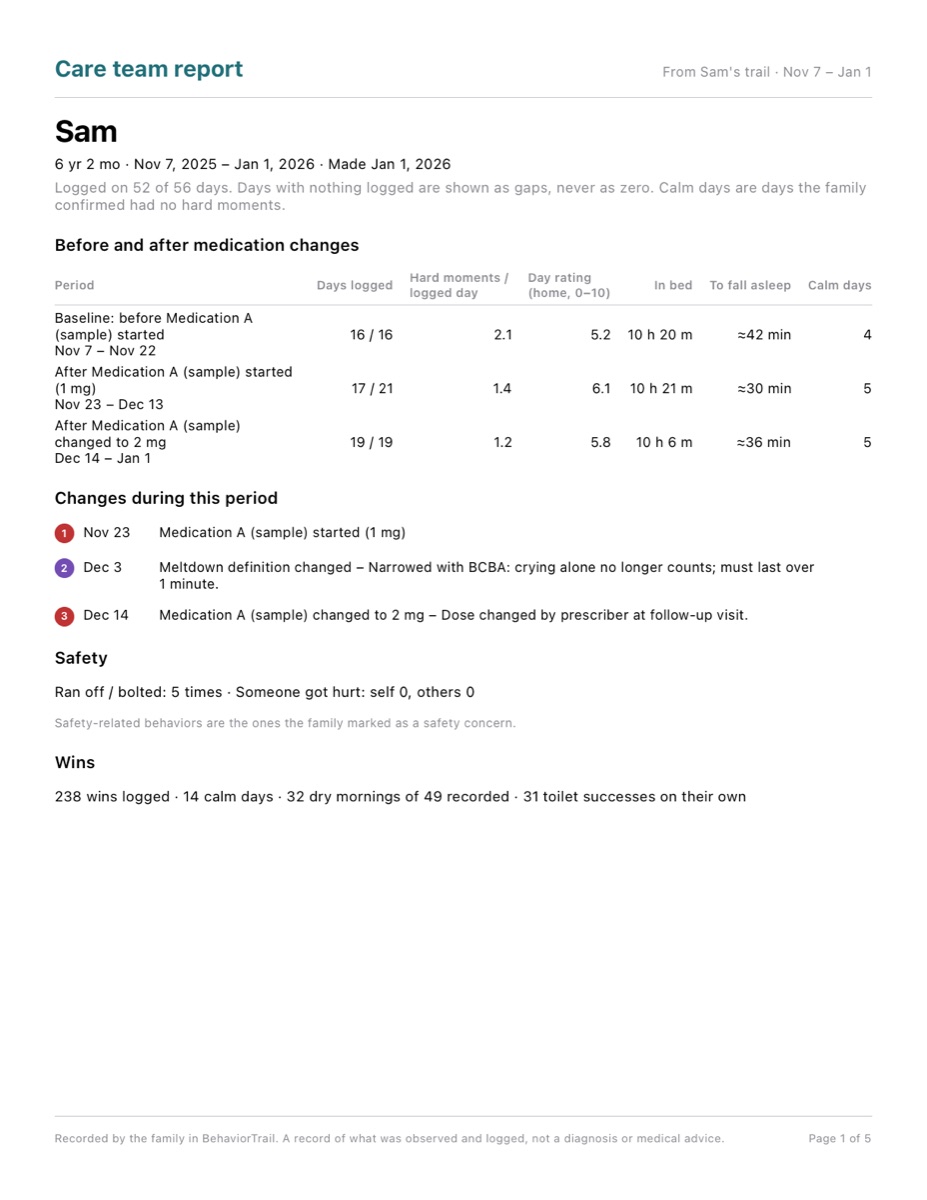
Each stretch between changes gets its own row: days logged, hard moments per day, the average day rating, time in bed, time to fall asleep, and calm days. Every change in the period is listed and numbered, along with safety-related moments and the wins.
Starting something new? Start the trail two weeks before. The weeks before are marked as the baseline, so the report shows a real before and after.
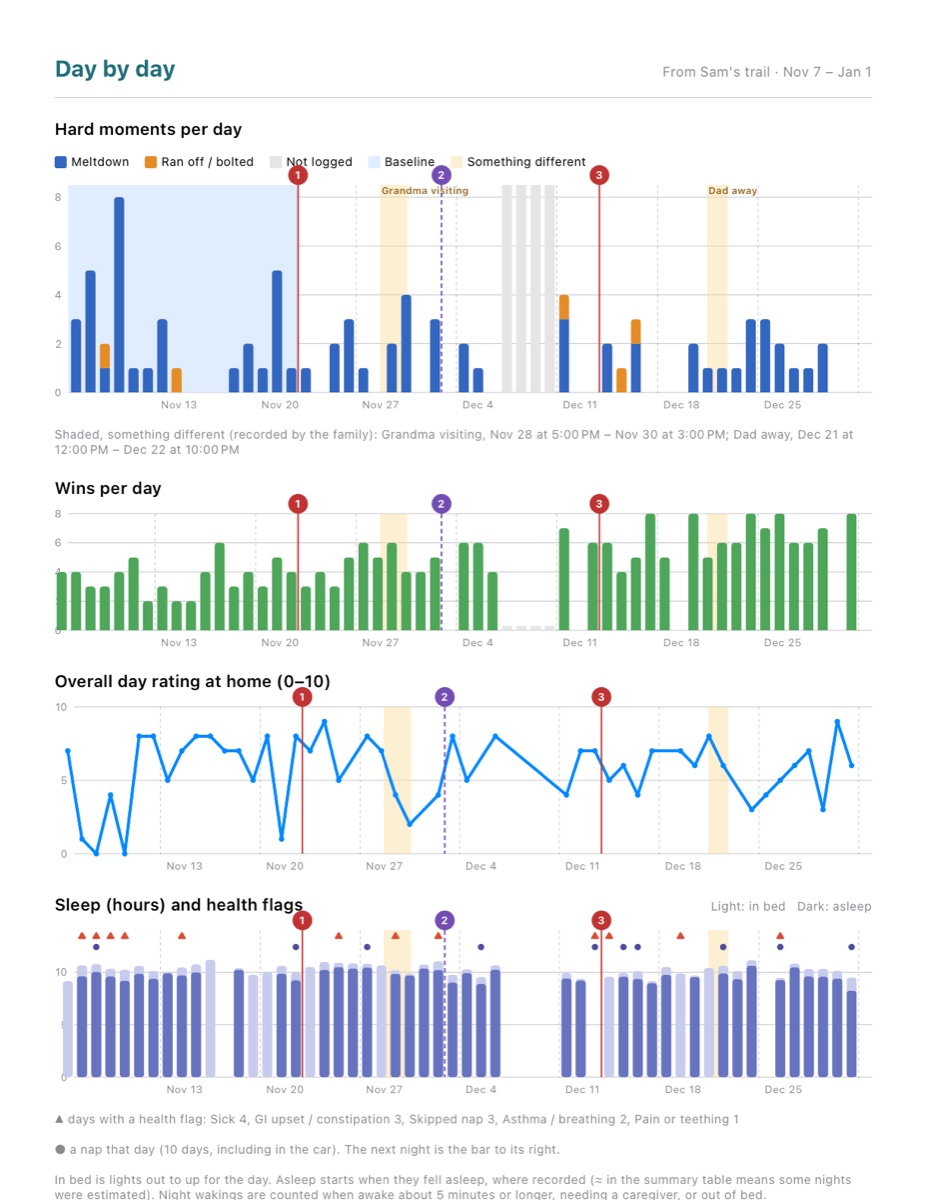
Hard moments, wins, the day rating at home, and sleep with health flags, stacked on the same dates. Medication and definition changes are numbered lines through every chart.
Days nobody logged are shown in grey, never counted as zero, so a quiet week of not logging never looks like a calm week.
Context goes on the same timeline: car naps, and "something different" stretches like a parent away on a work trip, shaded for exactly the hours they covered.
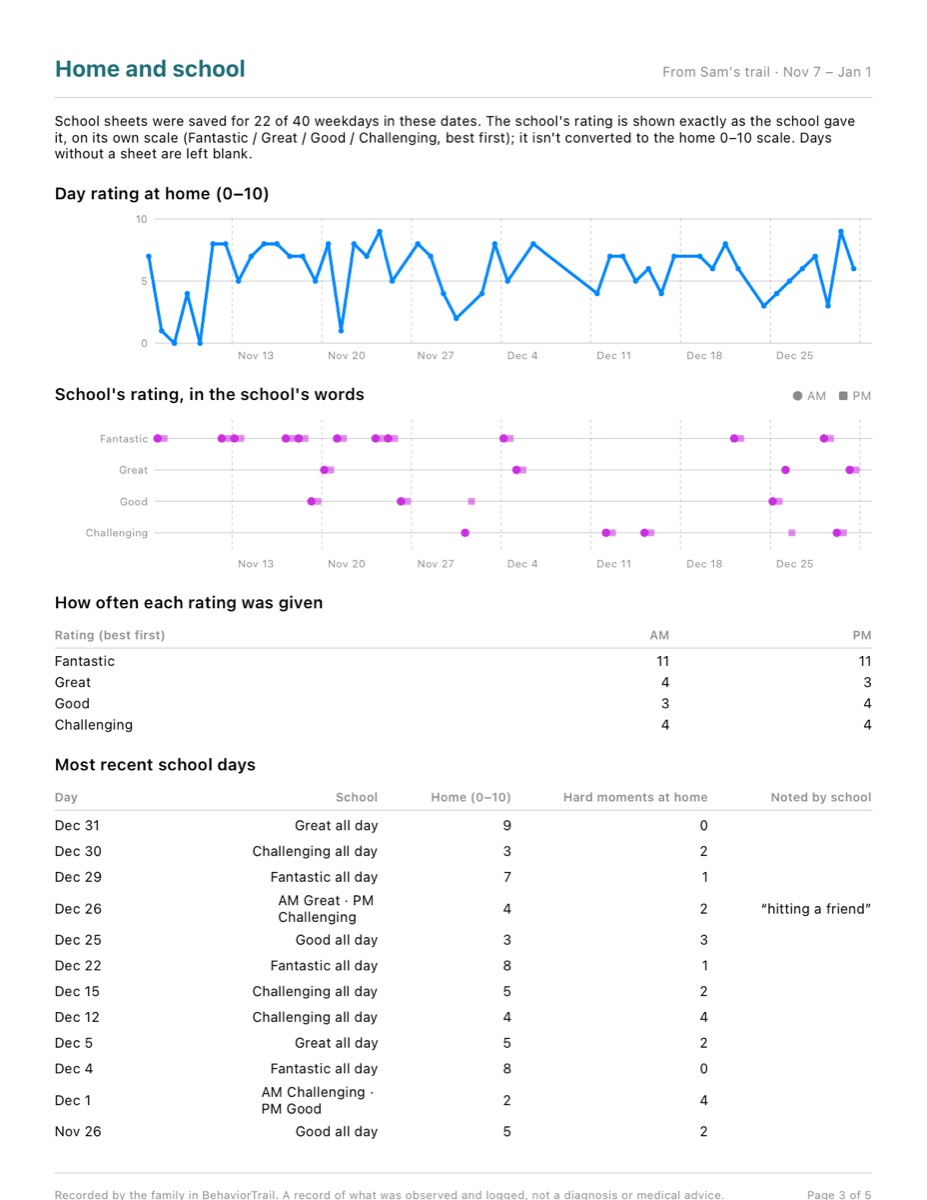
Your 0 to 10 rating of the day, above the school's own rating in the school's own words, morning and afternoon, on the same dates. Never converted into numbers, so nothing is lost in translation.
Below it: how often each rating came home, and the recent school days with what the teacher wrote, quoted.
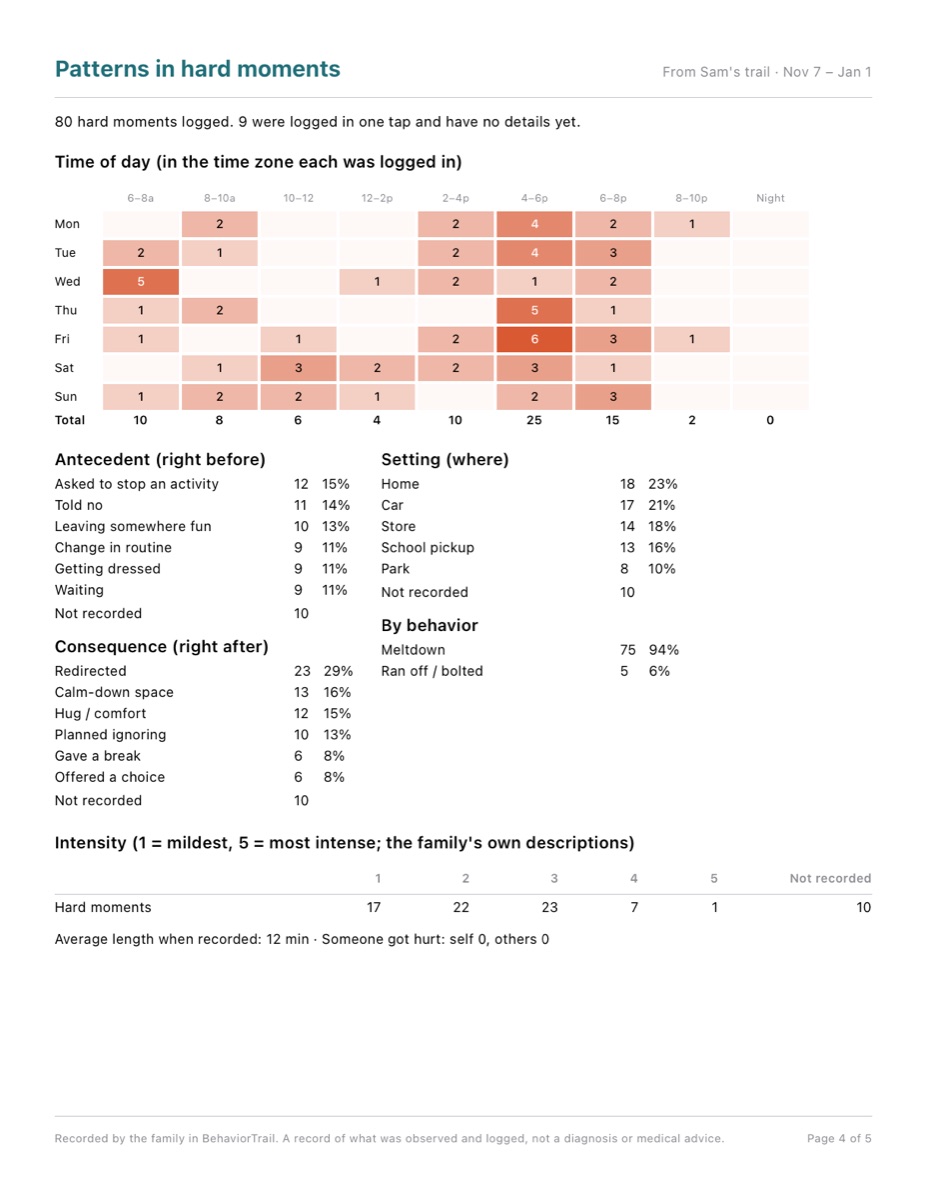
A map of weekday by time of day. What most often happened right before and right after, where it happened, and how intense, described in your own words.
The last page adds toileting week by week and every dose with its time.
BehaviorTrail doesn't decide what a pattern means, and it never suggests treatments or doses. It shows the data side by side, with the dates and counts behind every chart, so you and your care team can look at it together. Choose 4, 8 or 12 weeks, and show your child's first name or initials only.
Shown with made-up sample data.
The trail is how you keep track. The loop is how things get better.
No accounts to create, nothing to sign in to.
BehaviorTrail is a record-keeping tool. It doesn't diagnose, give medical advice, or recommend treatments or medication doses. Talk with your care team about what your records show. If anyone is in danger right now, call 911.